Instalação e Downloads:
Nota: a instalação do Visual Web Developer (VWD) irá fazer download do SQL Server caso este não esteja instalado no sistema. Uma vez que existem várias distribuições do SQL Server será preferível instala-lo antes do VWD, de forma a escolher a versão mais apropriada.- Microsoft® SQL Server® 2008 Express with Tools
- Visual Web Developer 2008 Express Edition SP1 or download here.
Tutoriais:
Meus favoritos:- ASP.NET Data Access Tutorials: a series of tutorials that will explore techniques for implementing these common data access patterns in ASP.NET 2.0;
- Oficial Site: where you can find plenty of articles/tutorials about the technology. The articles are divided in 3 main categories: "ASP.NET Web Forms"; "ASP.NET MVC"; "ASP.NET AJAX"
- ASP.NET Walkthroughs by Scenario: This topic lists a selection of walkthroughs (tutorials) that introduce you to Web development concepts in ASP.NET. These walkthroughs also cover Web development features in Visual Studio 2010;
Outros:
- ASP.NET master pages;
- ASP.NET Security;
- Scott Mitchell has an excellent tutorial about building data driven applications with ASP:NET. The tutorial starts with the creation of a software architecture composed of a Data Access Layer (DAL) using Typed DataSets, a Business Logic Layer (BLL) that enforces custom business rules, and a presentation layer composed of ASP.NET pages that share a common page layout. Once this backend groundwork has been laid, it moves into reporting, showing how to display, summarize, collect, and validate data from a web application.
- Indice de vários artigos por categoria
- Accessing and Updating Data in ASP.NET: Data Source Control Basics
- ASP.NET Themes: [1][2]
Artigos específicos:
- Custom ASP.NET base pages: [1][2]
- Extending Base Type Functionality with Extension Methods :Extension methods allow a developer to tack on his own methods to an existing class in the .NET Framework. [1][2]
- Control ID Naming in Content Pages: Certain ASP.NET server controls act as naming containers, which affects the rendered
idattribute values of their descendent controls as well as the scope of controls canvassed by theFindControlmethod. - How Events Are Connected to Event Handlers
Terminologia:
- App_Data folder: a folder that you can add to your website specifically for storing data files, such as XML files, Access database files (
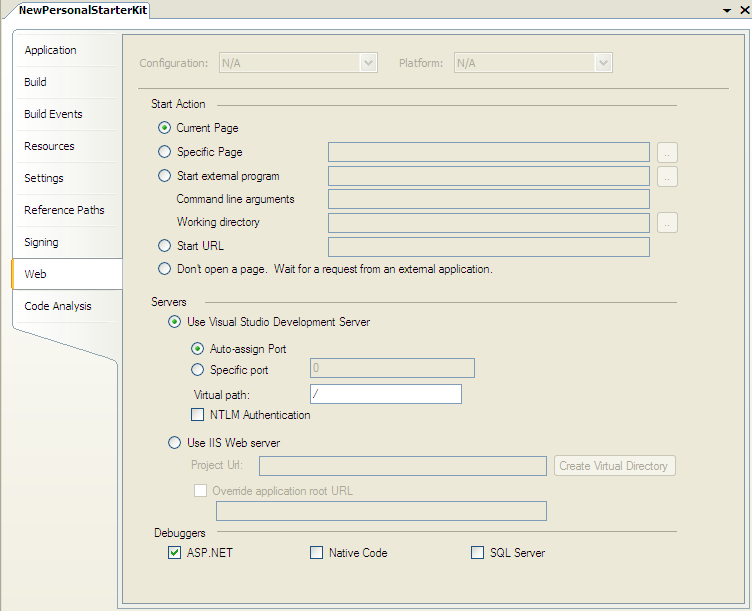
.mdb), and SQL Server 2000 and SQL Server 2005 Express edition database files (.mdf). Of course, ASP.NET can work with databases that are not in theApp_Datafolder. When using professional grade database systems, like Microsoft SQL Server, typically the database is registered on a separate database server. - Cassini (aka "Visual Studio Web Server"): Once you cleanly compile and run your application in Visual Studio, by default, it will use the built-in VS Web Server (aka Cassini) to run the site. You can alternatively configure the project to use IIS instead. To manage these settings, right-click on the project and pull up its project properties. You can then select the "Web" tab to configure these runtime settings:
- Site Map:a robust site map framework that enables ASP.NET page developers to define a hierarchical site map in an external resource (such as an XML file or database table). [1(See Step 3)]
Notes:
- Databinding commands like
Eval()andBind()can only appear in controls whose view state is enabled (article);

No comments:
Post a Comment